Use cases
Meeting notes for small teams
How a small team runs its weekly meeting in the sample Sandbox Notes app: one notebook, one template, decisions and owners for every action item.
Who it is for Teams of 3 to 10 people who meet every week
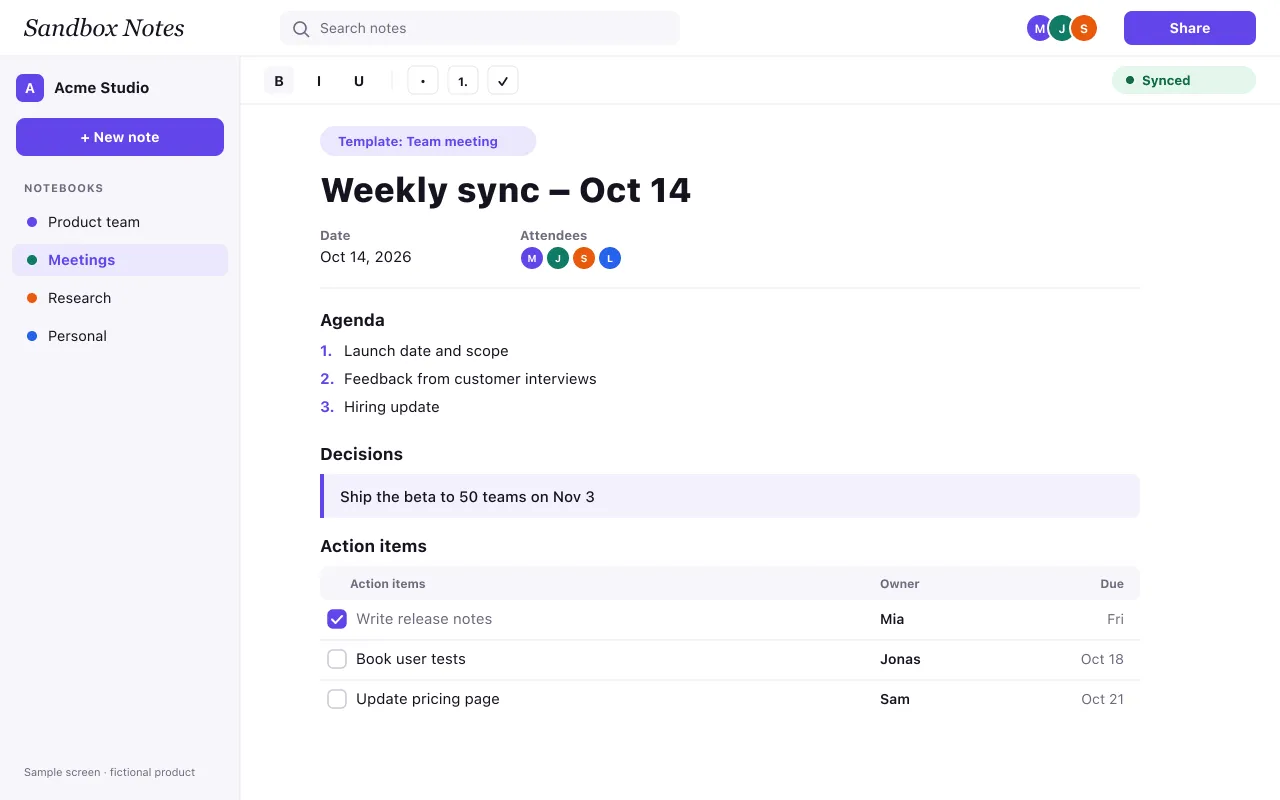
Sample content: Sandbox Notes is a fictional product, and the team below is made up. The page shows how a use-case page walks through a real workflow from start to finish.
The situation
A product team of six meets every Monday. Before Sandbox Notes, the agenda lived in the calendar invite, decisions were scattered across chat, and action items sat in whoever took notes that week. By Thursday, two people were working on the same task and nobody was sure whether the launch date had moved.
The setup, once
The team creates a Meetings notebook and shares it with everyone as editors. The weekly note uses the team meeting template, which always has the same parts:
- Agenda: topics added by anyone before the meeting.
- Decisions: one line per decision, in plain words.
- Action items: a task, an owner and a due date.
Because every note looks the same, people know where to look, even in a meeting they missed.
A typical week
On Friday, anyone can add a topic to next Monday’s agenda. During the meeting, one person writes and the others watch the note update live; they can correct a decision before the meeting ends instead of in a follow-up message. After the meeting, each owner sees their action items and ticks them off as they finish. If someone is on a train with no signal, they keep working and their changes sync later.
Finding things later
Search covers every note in the notebook, so “launch date” finds the decision and the meeting where it was made. The version history shows who changed a decision and when.
What it needs
The template and search are part of every plan. Sharing the notebook with the whole team uses roles from the Team plan, and offline editing needs Pro or Team. See the pricing page, the shared notebooks feature, or our guide on how to take useful meeting notes.