Features
Offline sync for notes
How offline sync works in the sample Sandbox Notes app: notes save on your device first, wait in a queue, and merge when you reconnect.
Included in ProTeam
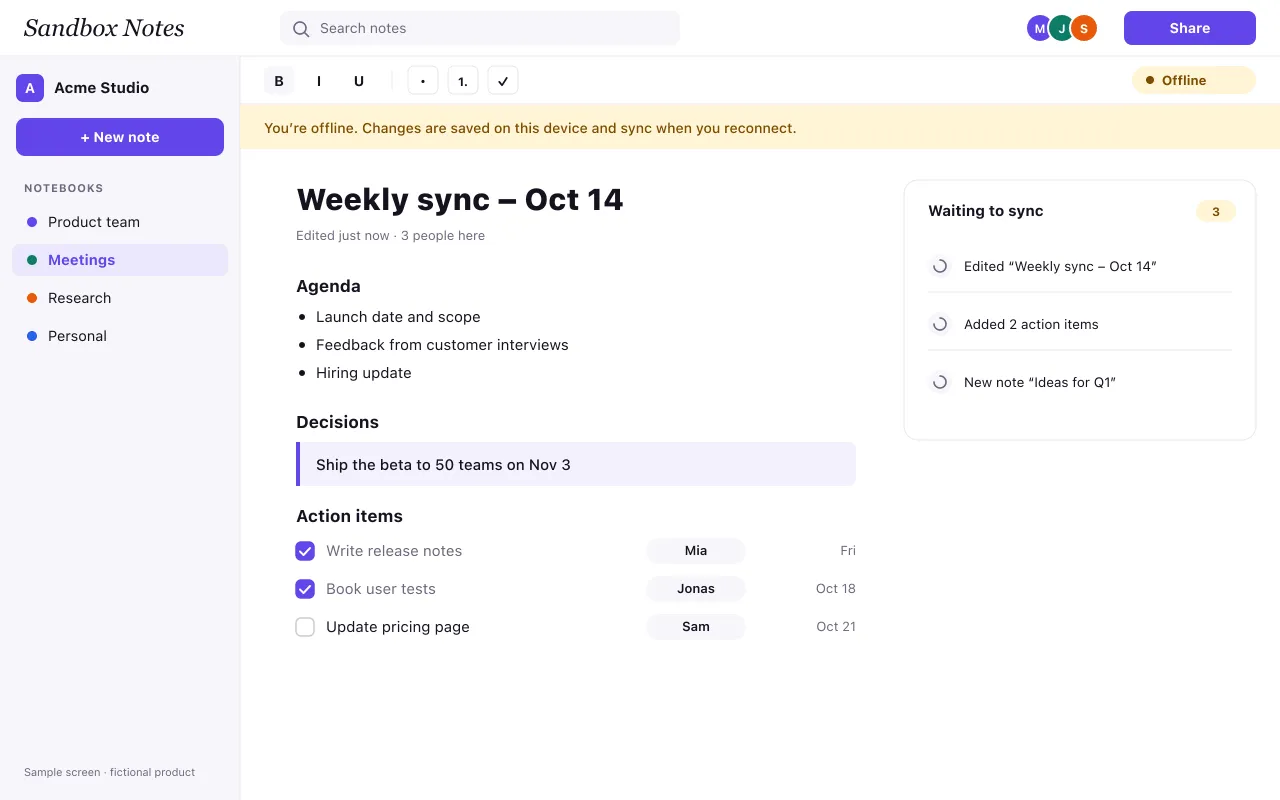
Sample content: Sandbox Notes is a fictional product. This page shows how a real feature page explains a technical feature in plain words, with a screenshot and the plans that include it.
The short answer
Sandbox Notes saves every change on your device first and sends it to the server in the background. If the connection drops, nothing changes for you: you keep typing, and a small Offline label appears next to the toolbar. When the connection comes back, the waiting changes are sent in the order you made them.
What you can do offline
- Open any notebook you have opened on that device before.
- Create, edit, move and delete notes.
- Tick off action items and add new ones.
- Search the notes stored on the device.
Inviting people and changing roles need a connection, because the server has to check who is allowed to do what.
What happens to the waiting changes
While you are offline, a panel lists the changes that are waiting to sync, such as an edited note or two new action items. Nothing is lost if you close the browser tab; the queue is kept on the device and sent the next time you open Sandbox Notes online.
When two people edit the same note
Edits are merged line by line. If you and a teammate changed different paragraphs, both changes are kept. If you changed the same sentence, the later change wins and the earlier one stays in the version history, so it can be restored with one click. Nobody gets a silent overwrite.
Storage on your device
Notes are stored in your browser’s own storage for that site. Signing out removes them from the device. On a shared computer, use a private window or sign out when you are done.
Plans
Offline sync is part of Pro and Team; the Free plan works online only. Compare the plans on the pricing page, or read the guide on how offline-first note apps work.