Features
Shared notebooks with roles
How shared notebooks work in the sample Sandbox Notes app: invite teammates and guests, give each person a role, and see who changed what.
Included in ProTeam
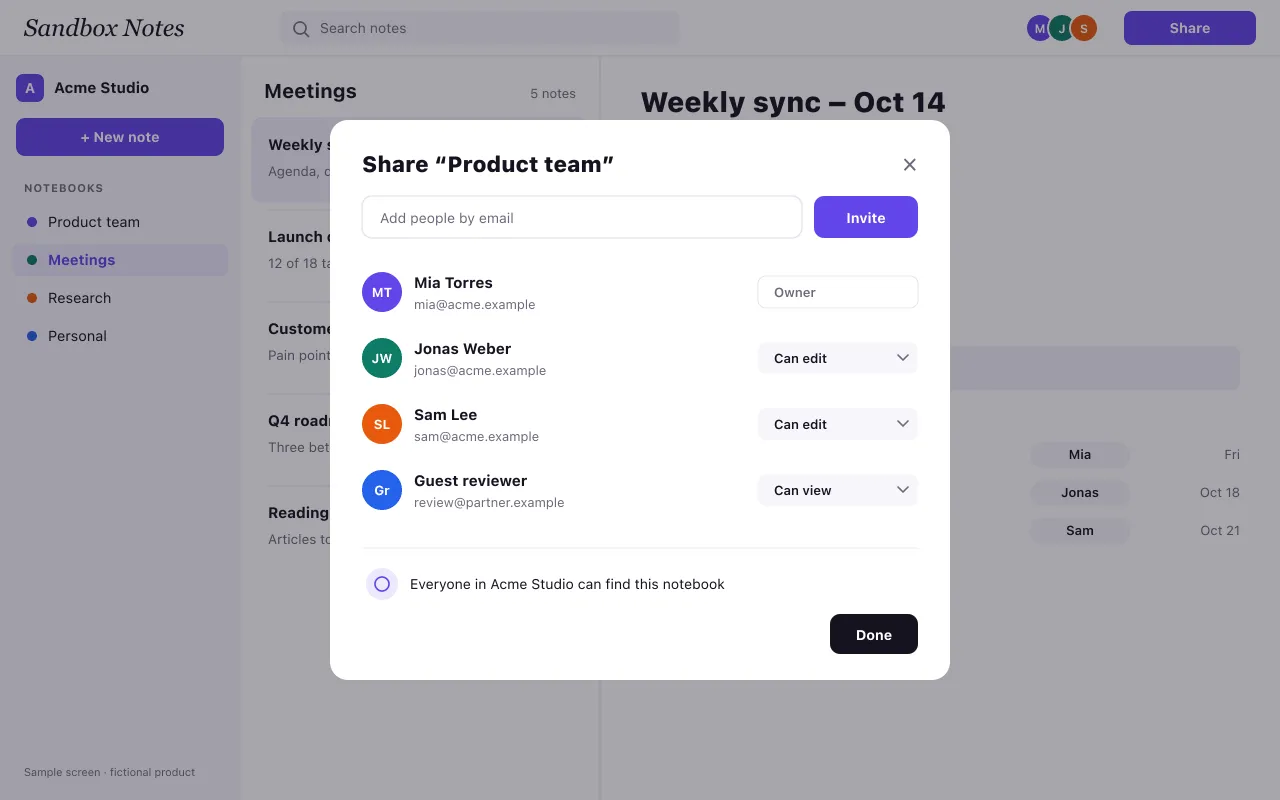
Sample content: Sandbox Notes is a fictional product. This page shows how a real feature page is built: a screenshot, the plans that include the feature, and enough detail to answer the questions people actually ask.
What a shared notebook is
A notebook is a folder of notes about one topic, such as a project, a client or a recurring meeting. When you share it, everyone you invite sees the same notes, in the same order, with the same history. Nobody has to forward a document or ask for the latest version, because there is only one version.
Who can do what
Each person in a notebook has one of three roles:
- Owner: manages members and roles, and can archive or delete the notebook.
- Editor: creates, edits and moves notes, and can tick off action items.
- Viewer: reads notes and comments, but cannot change them.
Roles are set per notebook, not per workspace. A freelancer can be an editor in the project notebook and see nothing else in your workspace. Guests from outside your company are marked as guests in the member list, so it is always clear who can read what.
Inviting people
Open the notebook, choose Share, type an email address and pick a role. The invite arrives by email; the person joins with one click. If you remove someone later, they lose access at once, and their earlier edits stay in the history with their name.
Seeing who changed what
Every note keeps a version history. You can open an earlier version, compare it with the current one, and restore it if a paragraph was deleted by mistake. How far back the history goes depends on the plan.
Plans
Sharing with guests is part of Pro. Roles for a whole team and a shared team workspace are part of Team. The pricing page lists exactly what each plan includes, and the meeting notes use case shows a shared notebook in a typical week.